Deployment to Kubernetes
LSC SDE uses Azure Kubernetes, Helm charts, and Flux for deployment and running Docker containers. The installation guide is currently available here.
Cr8tor Publisher microservices are deployed to separate Kubernetes clusters, each dedicated to a specific environment:
| Environment | Endpoint | GitHub Self-Hosted Runner |
|---|---|---|
| DEV | dev-cr8tor.xlscsde.nhs.uk | dev-vm-01 |
| TST | stg-cr8tor.xlscsde.nhs.uk | test-vm-01 |
| PROD | cr8tor.xlscsde.nhs.uk | prod-vm-01 |
We can release different versions of the app to each environment. Steps:
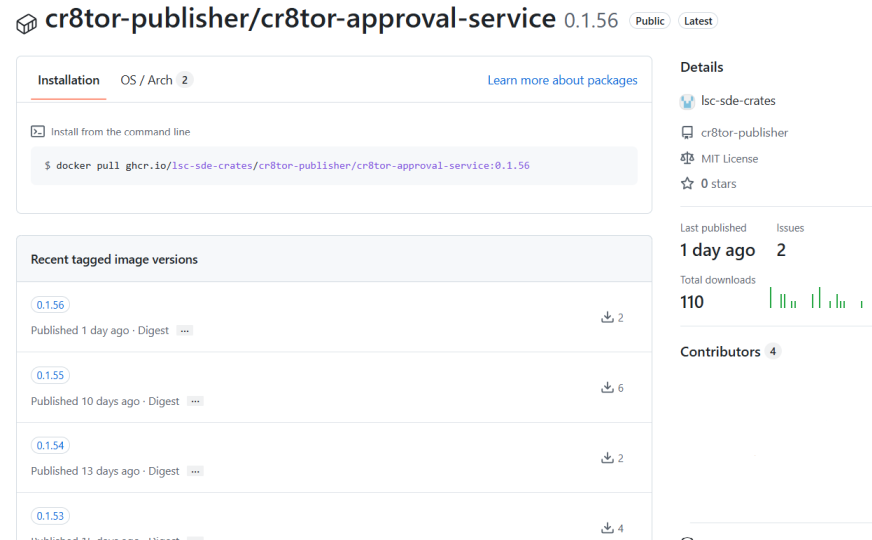
- Build the package by running the Docker build and push workflow. This runs automatically after merging to the main branch. The build creates a versioned image for each microservice.

-
Note down the version, e.g. 0.1.55, you want to deploy to the Kubernetes cluster. Navigate to
iac-flux-lscsderepo https://github.com/lsc-sde/iac-flux-lscsde/blob/dev/core/helm-config.yaml https://github.com/lsc-sde/iac-flux-lscsde/blob/dev/core/image-config.yaml Update the version in the appropriate branch:dev,stgorprod. -
The Kubernetes process monitors changes in the respective branch and automatically updates itself when new changes are pushed.